18 Module areas156 Feature highlightsCustomizable Business workflows
BUILT AROUND YOUR BUSINESS
Your business. Across every channel.
Organizations connecting core business workflows with dedicated enterprise modules and a customizable hybrid working experience.
AIMSEDGE & IRAEDGE / HYBRID ERP
One connected ERP. More ways to work.
Our Hybrid ERP approach brings Desktop, Web and Mobile (Android/iOS) experiences together around your business workflows.
01 / DESKTOP
Power at your workstation.
Work through detailed ERP transactions, operational records and reports in the desktop application.
Desktop ERP application
Q-Soft Hybrid ERP
02 / WEB
Your ERP in the browser.
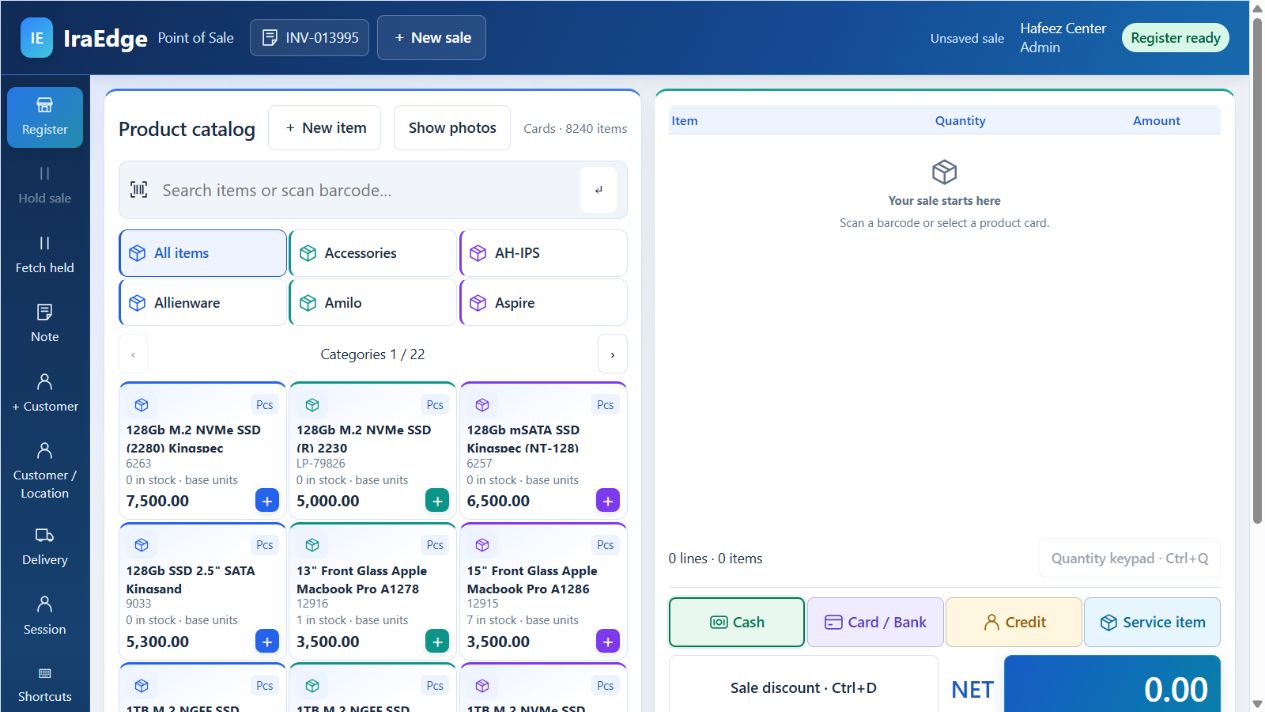
Access supported ERP workflows, business information and reporting through the configured web application.
Browser-based ERP access
Android + iOS
03 / MOBILE
Business beyond the desk.
Bring selected mobile ERP functions to Android and iOS, with workflows suited to your team’s responsibilities.
Mobile / Android & iOS · Layout preview
HYBRID ERP / CONNECTED EXPERIENCES
Your ERP. Everywhere your business needs it.
AimsEdge Hybrid ERP and IraEdge Hybrid ERP connect your business through Desktop, Web and Mobile — Android & iOS.
DESKTOP↔WEB↔ANDROID / iOSONE CONNECTED BUSINESS PLATFORM
Available client functions, mobile delivery and connectivity are defined by your product release and implementation. The IraEdge prototype combines a captured WinForms dashboard, a saved web POS screen and a mobile dashboard layout preview.
UP TO80%ERP CUSTOMIZATION
YOUR BUSINESS. YOUR ERP. YOUR CONTROL.
Built for your business. Customized by you.
We create ERP software you can customize to match the nature of your business—with up to 80% customization without technical knowledge or programming skills, using our AI-based architecture.
With AimsEdge Hybrid ERP and IraEdge Hybrid ERP, shape supported forms, fields, layouts, reports, dashboards and business rules around the way your team works.
No programming skills requiredBusiness-led configurationFlexible working tools
KEY ERP FEATURES / BEYOND THE MODULES
Powerful capabilities. Practical business advantages.
Discover the working features behind AimsEdge Hybrid ERP. Click a card to explore the tools, controls and everyday possibilities.
Key feature
01 / KEY ERP FEATURE
Connected transactions
Link business documents and operational records so purchasing, stock, sales and accounts stay connected.
Shared recordsDocument links
CONNECTED TRANSACTIONS
Enter once. Follow the whole workflow.
Document relationships follow supporting records through purchasing, receipt, invoicing and payment.
Shared business records keep customers, suppliers, items and accounts consistent across workflows.
Transaction context retain references, attachments and notes with the business activity.
Key feature
02 / KEY ERP FEATURE
Financial visibility
Review financial position, customer dues, supplier balances and cash or bank activity from connected records.
BalancesCash & bank
FINANCIAL VISIBILITY
Understand balances and commitments.
Financial statements review trial balance and supported accounting reports.
Receivable and payable visibility follow outstanding customer and supplier amounts.
Cash and bank control organize receipts, payments, vouchers and cheque information.
Key feature
03 / KEY ERP FEATURE
Stock visibility & control
Follow inventory across locations and movements, with product detail and the stock controls your implementation requires.
LocationsMovement history
STOCK VISIBILITY & CONTROL
Know what is available and where.
Stock movements connect receipts, issues, transfers and adjustments.
Item detail retain configured units, groups, locations and product attributes.
Stock reporting review balances and movement history before making operational decisions.
Key feature
04 / KEY ERP FEATURE
Flexible pricing & fulfillment
Keep quotations, orders, invoicing, discounts and returns connected to your customer and stock records.
PricingOrders & returns
FLEXIBLE PRICING & FULFILLMENT
Carry commercial detail through the sale.
Pricing and discounts apply configured rates and commercial terms.
Order-to-invoice workflow retain customer and document references through sales activity.
Returns and balances connect returned goods with customer account context.
Key feature
05 / KEY ERP FEATURE
Business reporting & analysis
Explore financial and operational reports to understand performance, balances and exceptions.
ReportsAnalysis
BUSINESS REPORTING & ANALYSIS
Turn daily activity into useful information.
Operational reporting review sales, purchases, inventory and financial information.
Focused analysis use supported filters to narrow the working view.
Report outputs print or export supported reports for business review.
Key feature
06 / KEY ERP FEATURE
Users, roles & business controls
Organize user responsibilities and transaction controls around the people working in your ERP.
User accessValidation
USERS, ROLES & BUSINESS CONTROLS
Give every role the right access.
User access manage supported access to business functions.
Transaction checks apply configured rules to required information and document entry.
Implementation configuration align available controls with your team and selected release.
Key feature
07 / KEY ERP FEATURE
Personalized workspace
Adapt layouts, lists and saved views to suit the task and the person doing it.
LayoutsSaved views
PERSONALIZED WORKSPACE
A working view for every role.
Form layouts arrange fields and sections on supported screens.
Saved views retain useful grid layouts, filters and working perspectives.
Conditional appearance highlight important status and control visibility.
Key feature
08 / KEY ERP FEATURE
Up to 80% customization — no coding
Customize up to 80% of your ERP according to your business nature, without technical knowledge or programming skills, using our AI-based architecture.
Custom fieldsRules
UP TO 80% CUSTOMIZATION — NO CODING
Your business sets the shape of your ERP.
Custom data fields capture business information beyond the standard form.
Business relationships connect configured objects and navigation.
Validation and appearance configure rules around data entry and record context.
Key feature
09 / KEY ERP FEATURE
Report & dashboard designers
Shape reports, dashboards and pivot analysis for the decisions your team needs to make.
DesignersDashboards
REPORT & DASHBOARD DESIGNERS
Build insight around your questions.
Report design customize supported layouts and calculations.
Dashboard design combine charts and business views.
Pivot analysis regroup and summarize data using saved filters and criteria.
Key feature
10 / KEY ERP FEATURE
Approvals, audit & document states
Control supported document lifecycles and retain the context behind decisions and changes.
ApprovalsAudit
APPROVALS, AUDIT & DOCUMENT STATES
Keep review and responsibility visible.
State transitions manage configured preparation, review and posting steps.
Approval and audit history retain supported decision and change information.
Detailed permissions control records, fields and actions by role and business scope.
Key feature
11 / KEY ERP FEATURE
Desktop, web & integration
Use supported clients, APIs and communication workflows as part of a planned installation.
Desktop / webAPIs
DESKTOP, WEB & INTEGRATION
Connect the people and tools around your ERP.
Desktop and browser work through configured ERP applications.
API integration connect supported endpoints with other applications.
Mobile and sharing use functions included in your release and configured email or WhatsApp workflows.
Key feature
12 / KEY ERP FEATURE
Enterprise lifecycle visibility
Bring wider enterprise activity into the ERP through dedicated modules and connected records.
AssetsAgreements
ENTERPRISE LIFECYCLE VISIBILITY
Connect agreements, assets and operating records.
Asset lifecycle follow acquisition, assignment, depreciation, maintenance and disposal.
Agreement balances retain tenancy rent, leasing schedules and repayment context.
Operating history connect fleet, visitor and customer-care records with business responsibilities.
Features and access channels are configured for the selected product release and implementation scope.
THE MODULES / EXPLORE YOUR BUSINESS SYSTEM
Connect every function. Go deeper into the detail.
Explore the module cards. Flip one to see the workflows and controls behind it, or search for a capability your team needs.
18 module areas to explore
Finance
01 / BUSINESS MODULE
Accounting & finance
Connect daily entries, customer and supplier balances, and financial statements in one structured accounting workflow.
LedgersAR / APFinancial statements
ACCOUNTING & FINANCE
See the complete financial picture.
Chart of accounts organize account groups and financial classifications around your business.
Cash, bank and journal vouchers record receipts, payments and adjustments with traceable document references.
Receivables and payables follow outstanding balances, aging and payment allocations.
General ledger review transaction history and drill into the records behind account balances.
Financial statements explore trial balance, profit and loss, and balance sheet reporting.
Period and location reporting focus analysis on the fiscal year, company and operational scope you need.
Bank reconciliation compare bank records with the accounting entries.
Postdated cheques follow receivable and payable cheque commitments.
Operations
02 / BUSINESS MODULE
Inventory & warehouses
Coordinate product masters, stock quantities and warehouse movements while keeping item-level detail available to the people who need it.
Multi-UOMWarehousesStock movements
INVENTORY & WAREHOUSES
Every item. Every location. One view.
Product masters organize groups, categories, manufacturers and product attributes.
Units and packaging manage multiple units, pack sizes and base-unit stock quantities.
Warehouse visibility review stock by store, warehouse and location.
Stock movements connect openings, transfers, adjustments and stock audits.
Barcode and serial workflows identify products and track serialized stock where configured.
Stock intelligence analyze stock position, aging, reorder needs and valuation.
Batch and lot records retain manufacturing dates, expiry and product batch identity.
Requisitions, issues and receipts connect internal stock requests with movement records.
Operations
03 / BUSINESS MODULE
Procurement & purchasing
Keep supplier activity, purchase orders, received stock and invoice costs connected across the purchasing cycle.
SuppliersOrdersPurchase costing
PROCUREMENT & PURCHASING
From a buying decision to a settled invoice.
Supplier records keep terms, account balances and purchase history within reach.
Purchase orders capture ordered products, quantities, pricing and delivery requirements.
Invoice and return workflows connect purchases and returns with their original references.
Landed-cost visibility account for invoice expenses that affect product cost.
Purchase payments follow paid and due amounts alongside supplier liabilities.
Procurement reporting review purchasing by supplier, product and period.
Purchase requisitions and RFQs organize requests and supplier quotations.
Goods receipts and imports connect GRNs, import records, letters of credit and costing sheets.
Commercial
04 / BUSINESS MODULE
Sales & receivables
Bring quotations, orders, invoices, pricing and collections into a shared commercial workflow.
QuotationsOrders & invoicesCustomer recovery
SALES & RECEIVABLES
Connect the sale to everything that follows.
Quotation-to-order flow connect proposed pricing with customer sales orders.
Invoicing and returns carry product, tax, discount and reference details through the transaction.
Price lists and discounts support customer pricing and invoice-level commercial controls.
Credit and collections review customer balances, due amounts and recovery activity.
Salesperson visibility track activity, targets and commission-related information.
Sales and margin analysis understand performance by product, customer and period.
Deliveries and gate passes connect dispatch documents with sales fulfillment.
Customer schemes and loyalty retain configured discount schemes, pricing notes and loyalty records.
People
05 / BUSINESS MODULE
HR & payroll
Connect employee records, working time, salary components and payroll documents in a coordinated workforce workflow.
AttendanceSalary componentsLoans & advances
HR & PAYROLL
From attendance to payroll, with context.
Employee setup maintain departments, designations, employment types and payroll profiles.
Attendance and timesheets bring working time, leave and overtime into salary preparation.
Salary components combine allowances, deductions, contributions and commissions.
Loans and advances follow outstanding employee balances and installment recovery.
Payroll vouchers prepare salary periods, tax calculations and payroll totals.
Payroll reporting review salary details, payslips and employee-level financial information.
Payroll templates reuse configured salary structures and payroll information.
Attendance import bring supported attendance data into the workforce workflow.
Finance
06 / BUSINESS MODULE
Fixed assets
Connect asset acquisition and ownership with maintenance, depreciation, transfer and disposal.
Asset registerDepreciationMaintenance
FIXED ASSETS
Know the value, location and life of every asset.
Asset register organize asset types, groups, categories and locations.
Assignment and transfer record responsibility and movement between locations.
Depreciation runs calculate period depreciation and review the associated records.
Maintenance and service track service providers, costs and completed work.
Asset audits review physical assets against their business records.
Disposal retain sale, condition, value and accounting context at the end of an asset’s life.
Operations
07 / BUSINESS MODULE
Projects & jobs
Organize customer projects, assigned work, deadlines and task progress alongside the business records that support delivery.
AssignmentsTasksDelivery dates
PROJECTS & JOBS
Keep the work and its ownership visible.
Project register define the customer, responsible team, value and delivery dates.
Task planning record subjects, priorities, assignment and due dates.
Progress visibility follow project and task status as work moves forward.
Time context review estimated and actual work information where available.
Supporting records keep notes and attachments connected to the project.
Company and location context organize work within the business scope it belongs to.
Project financial visibility review recorded income, expenses and project profit or loss.
Operations
08 / BUSINESS MODULE
Manufacturing & production
Connect recipes, work orders, material consumption and finished goods with production cost and variance visibility.
BOMWork ordersCost & yield
MANUFACTURING & PRODUCTION
Turn materials into measurable output.
Bills of materials define finished products, quantities, raw materials and units.
Work orders organize production dates, quantities and document status.
Production planning and stages organize configured production plans and stage information.
Production costing bring material, machine, overhead and outsourcing costs into the picture.
Material and output records connect consumption with finished-goods receipts.
By-products and wastage capture the additional outputs and losses that affect production.
Variance and yield review actual production results and their financial effect.
Commercial
09 / BUSINESS MODULE
Point of sale
Bring product selection, billing, payments and retail transaction history into the same business environment as stock and finance.
BillingPaymentsStock integration
POINT OF SALE
A front counter connected to the back office.
Product lookup work with searchable items, categories and barcode-led selection.
Customer billing connect the transaction with the right customer and price context.
Payment handling capture configured cash, bank and other payment methods.
Held transactions pause billing and return to the transaction when needed.
Print and transaction history prepare receipts and revisit billing records.
Retail integration carry sales activity into accounting, stock and business reporting.
Finance
10 / BUSINESS MODULE
Budget & spending
Organize budgeted receipts and spending, then compare actual activity and variance over the planning period.
PlanningActualsVariance
BUDGET & SPENDING
Keep the plan and the actuals in view.
Budget setup define the budget name, type and planning dates.
Receipts planning organize expected income and actual receipts.
Spending planning follow planned expenditure alongside actual spending.
Variance visibility review receipt, spending and surplus or loss differences.
Requisition workflow connect purchasing requests with the planning context.
Supporting controls retain budget status, approval history and attachments.
Operations
11 / BUSINESS MODULE
Fleet management
Manage vehicle identity, driver assignments, trips and operating records across the fleet lifecycle.
VehiclesDrivers & tripsFuel & service
FLEET MANAGEMENT
Keep vehicles and their operational history together.
Vehicle register maintain registration, ownership and vehicle specifications.
Driver assignment connect drivers and responsibilities to vehicles.
Trips and odometer follow journeys and distance-related records.
Fuel logs retain fuel activity for operational review.
Maintenance events keep service records and interval context with the vehicle.
Incidents and fines record accidents, penalties and supporting information.
Commercial
12 / BUSINESS MODULE
Tenancy & property
Connect owners, properties and tenant contracts with the rental periods and balances that matter.
PropertiesContractsRent collection
TENANCY & PROPERTY
Bring property, contracts and rent into one view.
Property register organize properties, types, ownership and condition.
Tenant contracts define tenant, contract dates and the property agreement.
Rent and charges record monthly rent and configured service charges.
Deposits and advances keep security and advance amounts tied to the contract.
Rental increments retain annual increase and last-increment context.
Collection visibility follow unpaid months, outstanding rent and payment detail.
Commercial
13 / BUSINESS MODULE
Leasing & installments
Manage purchase and sales lease records with advance amounts, repayment schedules and outstanding balances.
AgreementsSchedulesRepayments
LEASING & INSTALLMENTS
Keep the schedule and the balance connected.
Lease agreements record the lease category, number, reference and dates.
Advance and principal separate initial payments from the remaining amount.
Installment schedules define periods, installment counts and monthly payment amounts.
Interest context retain configured rates, interest amounts and associated accounts.
Overdue charges review configured fines alongside the repayment balance.
Repayment visibility follow paid, due and remaining amounts with supporting documents.
People
14 / BUSINESS MODULE
Visitor management
Coordinate visitor information, hosts, appointments and entry records for the business premises.
VisitorsHostsCheck-in / out
VISITOR MANAGEMENT
A clear record of who came, why and when.
Visitor profiles maintain visitor details and classifications.
Visit purpose capture the reason, appointment and host employee.
Entry and exit record check-in, check-out and gate information.
Visit status follow the state of the visit through its lifecycle.
Badge and vehicle detail connect access identifiers and arrival information.
Group visit context record the number of people associated with a visit.
Commercial
15 / BUSINESS MODULE
CRM & customer care
Organize leads, customer contacts and service concerns alongside your commercial workflows.
LeadsContactsCustomer care
CRM & CUSTOMER CARE
Keep the relationship beyond the invoice.
Lead records capture prospective customers and their business context.
Lead notes retain follow-up information and customer conversations.
Contact information connect people and their details to the customer record.
Sales inquiries organize requirements and incoming sales opportunities.
Complaint handling capture complaint types, notes and service records.
Warranty and customer service retain product warranty and claim-related context.
Finance
16 / BUSINESS MODULE
Tax & invoicing controls
Manage invoice tax information, withholding-related records and configured fiscal integrations within the operational workflow.
Tax detailWithholdingFiscal settings
TAX & INVOICING CONTROLS
Keep tax detail connected to the transaction.
Tax configuration define tax groups, treatments and transaction tax detail.
Invoice tax visibility follow calculated amounts alongside sales and purchasing records.
Withholding workflows connect deductions and tax detail with the relevant accounts.
Fiscal integration settings configure supported invoicing connections for your installation.
Permission-based access control the people who can use sensitive invoicing actions.
Tax reporting context retain transaction references for review and reporting.
Platform
17 / BUSINESS MODULE
Reporting & business intelligence
Explore financial and operational data with configurable reporting, dashboards and analytical views.
Report designerDashboardsPivot analysis
REPORTING & BUSINESS INTELLIGENCE
Move from records to insight.
Report designer adapt layouts and output to the information your team needs.
Operational and financial reports examine sales, purchases, stock and account activity.
Dashboards bring charts and business indicators into a focused management view.
Pivot analysis regroup and summarize information for different business questions.
Filters and saved views return to useful reporting perspectives more easily.
Export and sharing prepare PDF, spreadsheet and other supported outputs.
Platform
18 / BUSINESS MODULE
Administration & approvals
Coordinate business setup, document controls, user permissions and approval responsibilities across your ERP.
User permissionsApprovalsDocument controls
ADMINISTRATION & APPROVALS
Give every workflow the right level of control.
Business structure configure companies, locations and assigned operational access.
Document identity organize numbering, dates and document lifecycle settings.
Approvals assign authorities and review the progress of documents awaiting decisions.
Posting controls separate document preparation, approval and financial effect.
User configuration align editing, deletion, printing and export actions with permissions.
Activity and communication connect notifications, notes and supporting documents.
No matching modules.
Try another search or reset the category.
BEYOND THE MODULES / SHARED ERP CAPABILITIES
Powerful out of the box. Personal to your business.
IraEdge and AimsEdge share a flexible platform approach. Shape the workspace, information and controls around the people using them.
Experience
01 / PLATFORM CAPABILITY
Your workspace, your way
Shape the interface around each role, with configurable layouts, navigation and saved working views.
LayoutsView variantsThemes
YOUR WORKSPACE, YOUR WAY
Make the system work the way your team does.
Layout customization arrange fields and sections to suit the task.
Saved view variants retain different list or grid perspectives.
Conditional appearance highlight status and control field visibility.
Flexible lists sort, filter, group and resize the working view.
Navigation choices align menus and visible actions with user permissions.
Themes and readable views adapt the interface to user preferences.
Experience
02 / PLATFORM CAPABILITY
Up to 80% customization without coding
Customize up to 80% of your ERP to match your business nature without technical knowledge or programming skills, using our AI-based architecture. Shape supported fields, forms, business objects and rules through configuration tools.
Custom fieldsRelationshipsValidation
UP TO 80% CUSTOMIZATION WITHOUT CODING
Adapt business detail at the application level.
Custom fields add configured data members to supported business forms.
Custom business classes define additional business objects and navigation groups.
Relationships connect configured objects and supporting information.
Validation rules enforce required information and business conditions.
Appearance rules make forms respond to record and user context.
User model settings retain permitted interface and view customizations.
Insight
03 / PLATFORM CAPABILITY
Reporting that answers your questions
Combine report design, dashboards and analytical tools rather than relying on a single fixed output.
DesignersPivotsSaved filters
REPORTING THAT ANSWERS YOUR QUESTIONS
Build a view of the information you need.
Report customization adapt report layouts and supported calculations.
Dashboard design bring charts and key business views together.
Pivot analysis summarize and regroup data to explore patterns.
Criteria filtering narrow reports and records to relevant conditions.
Saved filters preserve useful working perspectives for repeat use.
Export formats prepare reports for PDF, spreadsheet and other supported outputs.
Governance
04 / PLATFORM CAPABILITY
Permission-aware control
Apply user and role controls to business records, navigation, actions and document workflows.
RolesAudit historyData access
PERMISSION-AWARE CONTROL
Put the right information in the right hands.
Role-based security assign access through defined responsibilities.
Record and field permissions align visibility and editing with authorization.
Action controls govern document changes, printing and data export.
Audit history retain supported change and activity information.
Business scoping manage access within company and location context.
Approval responsibilities define who can review and authorize documents.
Governance
05 / PLATFORM CAPABILITY
A connected document lifecycle
Combine document controls, approval information and workflow tools with the business activity they support.
ApprovalsState controlsNotifications
A CONNECTED DOCUMENT LIFECYCLE
Keep preparation, review and posting in step.
State-based workflows manage supported document states and transitions.
Approval tracking retain decision history and assigned responsibility.
Document copying reuse supported transaction data in related workflows.
Attachments and notes keep the supporting context with the record.
Notifications surface configured events and user information.
Calendar and tasks coordinate scheduled work and follow-up activity.
Connectivity
06 / PLATFORM CAPABILITY
Connected tools and delivery channels
Extend business information through supported desktop, web, API and communication experiences.
Desktop / webAPI accessOffice & sharing
CONNECTED TOOLS AND DELIVERY CHANNELS
Bring the business context into more places.
Desktop and browser clients access core ERP workflows through configured applications.
Mobile workflows use the mobile functions included in the selected product release.
API integration connect supported endpoints with other applications.
Office-style tools work with rich text, documents and spreadsheet experiences.
Report communication use configured email and WhatsApp sharing workflows.
Deployment planning discuss on-premises and hosted architecture for your installation.
Configuration and client availability depend on your selected modules, permissions and deployment.
FROM CAPABILITY TO YOUR BUSINESS
See the whole picture. Then make it your own.
Let’s walk through the modules, configuration and deployment that match your workflows. Your demo will focus on the product release and functionality suited to your implementation.

 QSOFTTECHNOLOGIES