
ERP and invoicing software
from Q-Soft.
Compare three ERP editions for accounting, stock and operations, or choose a dedicated subscription for FBR Digital Invoicing.
Q-SOFT / DIGITAL INVOICINGFBR Digital
FBR Digital
Invoicing.
A complete company workspace for invoice creation, advanced taxes, FBR validation and submission, QR printing and reporting. Built for web and Android.
 Q-SOFT CLOUDCreate → Validate → Submit → Share
Accepted invoices include the FBR reference and QR. Sandbox and production records stay separate.
See how it works →Standard Yearly
PKR 20,000/yearEnterprise Monthly
PKR 3,500/monthEnterprise Yearly
PKR 35,000/yearTry it for 7 days. New-company trial includes 2 users and 50 new invoices per calendar month. Paid allowances apply per company. Bank transfer is available initially; activation follows verified payment approval.
FBR Digital Invoicing functions
Invoice lifecycle
Create, duplicate, validate and submit multi-line invoices. Track drafts, rejections and accepted responses.
Advanced taxes
Percentage, fixed, mixed, retail-value and FED-in-ST calculations; zero-rated and exempt supplies; further/extra tax and withholding.
236G / 236H
Effective-dated advance-tax policies with separate ATL classifications and configurable applicability.
FBR reference data
Look up HS codes, units, sale types, rates, SRO schedules and serials against your FBR connection.
Buyers & items
Maintain buyer and item masters, unit conversion ratios and reusable tax settings.
Excel & CSV import
Map spreadsheet columns, group invoice lines and identify duplicates without replacing existing records.
Automatic submission queue
Validate before submitting. Correct known rejections; uncertain results stay locked for reconciliation.
QR invoices & branding
Official FBR logo and issued QR at the bottom-right. Choose print templates and customize your company branding.
Share & email
Create expiring public links, queue invoice emails and prepare WhatsApp share links.
Reports & audit history
Invoice, buyer, item, tax and status reports with date filters, CSV exports and recorded activity.
Multi-company SaaS
Separate company records, subscriptions and encrypted FBR credentials, with company switching.
Team permissions
Administrator, operator, creator and auditor roles. Invoice date locks and accepted-invoice protection.
Web & Android
Responsive web workspace and Android client with native print support and shared company records.
Three interface themes
Ocean, Emerald and Midnight, with a remembered browser preference.
Sandbox to production
Complete taxpayer onboarding in IRIS, then configure the issued production credentials and review go-live authorization.
Subscriptions & billing
7-day new-company trial. Monthly or yearly billing with bank-transfer references and verified administrator approval.
FBR enrollment, correct transaction details and production authorization are required. Subscription taxes, where applicable, are confirmed on the billing invoice.
Compare plans & features ↗01 / THE HYBRID BUSINESS PLATFORM AimsEdge Hybrid ERPBUSINESS PLATFORM
18 CONNECTED MODULE AREASFinance, payroll and enterprise departments.
AimsEdge Hybrid ERP covers finance, payroll and stock, with additional modules for fixed assets, fleet, properties, projects and CRM.
Hybrid accessBusiness modulesConnected workflows
02 / CONNECTED OPERATIONS & TRACEABILITY IraEdge Hybrid ERPBUSINESS PLATFORM
13 CONNECTED MODULE AREASBatch stock, manufacturing and fuel operations.
IraEdge Hybrid ERP combines accounting and payroll with batch tracking, production records, purchasing, sales and fuel-station workflows.
Batch traceabilityManufacturingDesktop & web
03 / THE BUSINESS FOUNDATION Aims ERPSTANDARD
8 CONNECTED MODULE AREASAccounts and stock for trading businesses.
Aims ERP Standard handles ledgers, inventory, purchases, sales returns and POS for wholesale, distribution and retail businesses.
AccountingInventorySales & POS
KEY ERP FEATURES
Check the tools available in each ERP.
Review stock controls, transaction handling, reports and personalization before choosing an edition.
AIMSEDGE & IRAEDGE / HYBRID ERPDesktop, browser
Desktop, browser
and mobile access.
AimsEdge and IraEdge support desktop, browser and mobile clients. The functions available on each client depend on your release and implementation.

Desktop transactions and reporting.
Enter vouchers, review stock movements and work with detailed records and reports in the desktop client.
Desktop ERP application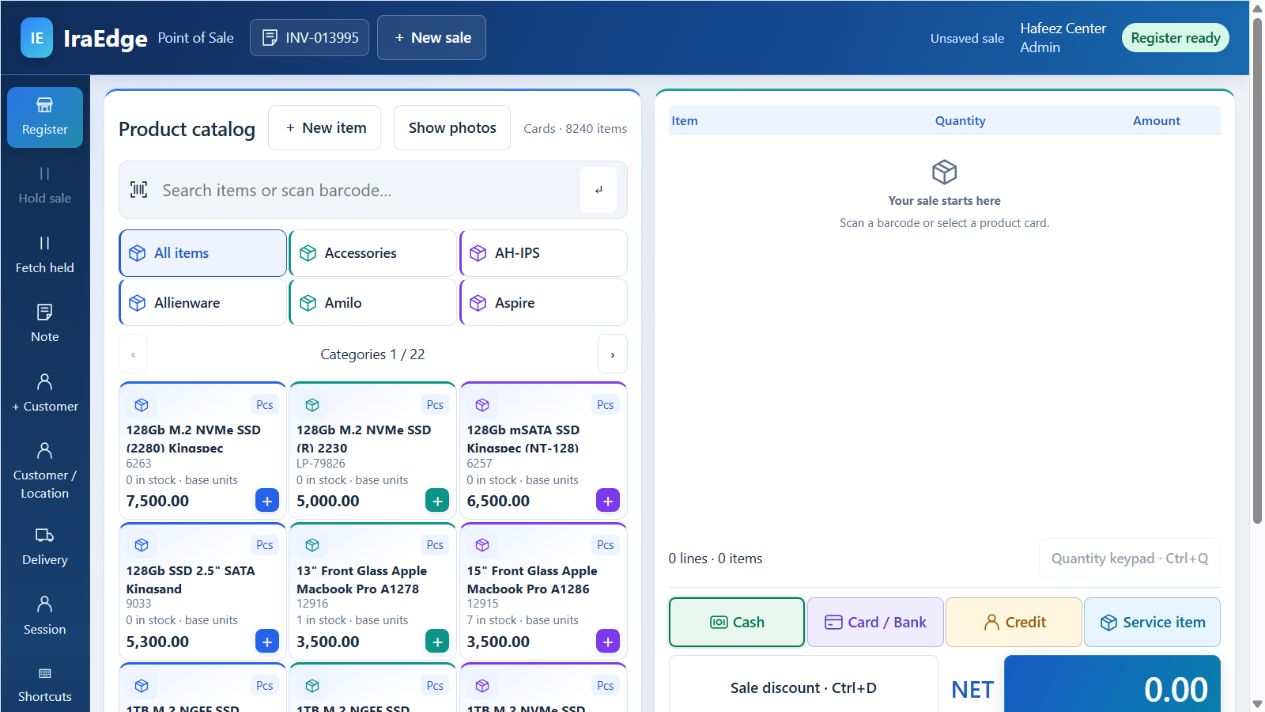
Browser access to configured modules.
Use the web application for the transactions, dashboards and reports enabled in your implementation.
Browser-based ERP access
Mobile access for assigned tasks.
Give field and management staff access to supported mobile functions on Android and iOS.
Mobile / Android & iOS · Layout preview AVAILABLE ERP CLIENTSChoose the clients
Choose the clients
your staff need.
AimsEdge Hybrid ERP and IraEdge Hybrid ERP connect your business through Desktop, Web and Mobile — Android & iOS.
DESKTOP ↔ WEB ↔ ANDROID / iOS ONE CONNECTED BUSINESS PLATFORM
Available client functions, mobile delivery and connectivity are defined by your product release and implementation. The IraEdge ERP prototype combines a captured WinForms dashboard, a saved web POS screen and a mobile dashboard layout preview.
UP TO80%ERP CUSTOMIZATION
FORMS · FIELDS · REPORTS · BUSINESS RULESConfigure forms, reports
Configure forms, reports
and business rules.
We create ERP software you can customize to match the nature of your business—with up to 80% customization without technical knowledge or programming skills, using our AI-based architecture.
In AimsEdge and IraEdge, adjust supported fields, form layouts, saved views, reports, dashboards and validation rules for your company.
COMPARE YOUR ERP FOUNDATION
Compare ERP editions by function.
Use the table to check which edition covers your departments and which requirements need a scope discussion.
Accounting, stock, production and specialist modules by edition.
AimsEdge ERP / IraEdge ERP / Aims| FIND THE RIGHT FITYour business requirements Check each required function against the three editions. | EXTENDED ENTERPRISEAimsEdge Hybrid ERP18 module areasExplore this product ↗ | OPERATIONAL DEPTHIraEdge Hybrid ERP13 module areasExplore this product ↗ | BUSINESS FOUNDATIONAims ERPStandard editionExplore this product ↗ |
|---|---|---|---|
| Core business Connect daily work | |||
| Accounting & finance | Core capability Vouchers, ledgers, bank reconciliation and financial statements. | Core capability Vouchers, ledgers, financial control and reporting. | Core capability Day-to-day accounts, vouchers, bank reconciliation and statements. |
| Inventory & purchasing | Core capability Multi-location stock, batch/expiry, requisitions, RFQs, GRNs and import costing. | Core capability Multi-location stock, batch/expiry, FEFO, purchasing and traceability. | Core capability Warehouses, multi-UOM, barcodes, purchase orders, invoices and returns. |
| Sales & point of sale | Core capability Order-to-invoice, delivery controls, retail billing and customer balances. | Core capability Sales, retail POS, receivables and connected transaction controls. | Core capability Sales orders, invoices, returns, discounts, receivables and retail POS. |
| People & production Coordinate people and output | |||
| Payroll & employee workflows | Core capability Attendance, payroll templates, salary processing and employee records. | Core capability Attendance, payroll processing and salary vouchers. | Discuss scope Discuss payroll requirements and additional module scope. |
| Manufacturing | Core capability BOM, production planning, stages, costing and variance analysis. | Core capability Recipes, work orders, batch genealogy and production traceability. | Discuss scope Discuss manufacturing requirements and product fit. |
| Projects & jobs | Core capability Project operations, job costing and project profit-and-loss. | Core capability Project records, job workflows and operational costing. | Discuss scope Discuss project-management requirements and scope. |
| Enterprise modules Go beyond the core | |||
| Assets & budgets | Dedicated module Dedicated fixed-assets, depreciation and budgeting modules. | Discuss scope Discuss asset and budget requirements for your configuration. | Discuss scope Discuss requirements beyond the core business modules. |
| Fleet & property operations | Dedicated module Fleet, tenancy, leasing and visitor-management modules. | Core capability Fuel-station operations alongside the core ERP modules. | Discuss scope Discuss specialist operations and integration needs. |
| Customer relationships | Dedicated module Dedicated CRM module, customer care and sales coordination. | Core capability Customer records, sales and receivables workflows. | Core capability Customer accounts, sales history and collections. |
| Platform & insight Shape the working experience | |||
| Reports & analytics | Core capability Report designer, dashboards, pivots, filters and exports. | Core capability Report designer, dashboards, pivots, filters and exports. | Core capability Business reports, graphical activity views, filters and exports. |
| Personalization & controls | Core capability Custom fields, layouts, saved views, validation, roles and approvals. | Core capability Custom fields, layouts, saved views, validation, roles and approvals. | Core capability Configured business tools, user maintenance and daily utilities. |
| Best fit Align the software with your priorities | |||
| Your starting point | Best fit Broader enterprise scope across finance, people, production and specialist modules. | Best fit Operational depth with batch traceability, manufacturing and fuel workflows. | Best fit A practical foundation for trading, wholesale, distribution and retail. |
| See it in action | |||
Module availability, configuration, client access and rollout scope are confirmed during your product walkthrough.
GUIDED STARTING POINT
Which operation do you need to manage?
Select an area to get a product recommendation.