8 Module areas48 Feature highlightsConnected Business workflows
BUILT AROUND YOUR BUSINESS
Clarity for the everyday.
Trading, distribution and retail teams that need connected day-to-day controls.
KEY ERP FEATURES / BEYOND THE MODULES
Powerful capabilities. Practical business advantages.
Discover the working features behind Aims ERP. Click a card to explore the tools, controls and everyday possibilities.
Key feature
01 / KEY ERP FEATURE
Connected transactions
Link business documents and operational records so purchasing, stock, sales and accounts stay connected.
Shared recordsDocument links
CONNECTED TRANSACTIONS
Enter once. Follow the whole workflow.
Document relationships follow supporting records through purchasing, receipt, invoicing and payment.
Shared business records keep customers, suppliers, items and accounts consistent across workflows.
Transaction context retain references, attachments and notes with the business activity.
Key feature
02 / KEY ERP FEATURE
Financial visibility
Review financial position, customer dues, supplier balances and cash or bank activity from connected records.
BalancesCash & bank
FINANCIAL VISIBILITY
Understand balances and commitments.
Financial statements review trial balance and supported accounting reports.
Receivable and payable visibility follow outstanding customer and supplier amounts.
Cash and bank control organize receipts, payments, vouchers and cheque information.
Key feature
03 / KEY ERP FEATURE
Stock visibility & control
Follow inventory across locations and movements, with product detail and the stock controls your implementation requires.
LocationsMovement history
STOCK VISIBILITY & CONTROL
Know what is available and where.
Stock movements connect receipts, issues, transfers and adjustments.
Item detail retain configured units, groups, locations and product attributes.
Stock reporting review balances and movement history before making operational decisions.
Key feature
04 / KEY ERP FEATURE
Flexible pricing & fulfillment
Keep quotations, orders, invoicing, discounts and returns connected to your customer and stock records.
PricingOrders & returns
FLEXIBLE PRICING & FULFILLMENT
Carry commercial detail through the sale.
Pricing and discounts apply configured rates and commercial terms.
Order-to-invoice workflow retain customer and document references through sales activity.
Returns and balances connect returned goods with customer account context.
Key feature
05 / KEY ERP FEATURE
Business reporting & analysis
Explore financial and operational reports to understand performance, balances and exceptions.
ReportsAnalysis
BUSINESS REPORTING & ANALYSIS
Turn daily activity into useful information.
Operational reporting review sales, purchases, inventory and financial information.
Focused analysis use supported filters to narrow the working view.
Report outputs print or export supported reports for business review.
Key feature
06 / KEY ERP FEATURE
Users, roles & business controls
Organize user responsibilities and transaction controls around the people working in your ERP.
User accessValidation
USERS, ROLES & BUSINESS CONTROLS
Give every role the right access.
User access manage supported access to business functions.
Transaction checks apply configured rules to required information and document entry.
Implementation configuration align available controls with your team and selected release.
Features and access channels are configured for the selected product release and implementation scope.
THE MODULES / EXPLORE YOUR BUSINESS SYSTEM
Connect every function. Go deeper into the detail.
Explore the module cards. Flip one to see the workflows and controls behind it, or search for a capability your team needs.
8 module areas to explore
Finance
01 / BUSINESS MODULE
Financial control
Connect transaction entry with the reports your accounts team needs. Organize your chart of accounts and follow payments, receipts and balances through the business.
Financial control
FINANCIAL CONTROL
Build a clearer financial picture.
Flexible chart of accounts and account groups
Cash, bank, payment and receipt vouchers
Cheque management and bank reconciliation
Journal, custom and recurring vouchers
Reversing entries and bulk payment or receipt entry
Trial balance and financial statements
Operations
02 / BUSINESS MODULE
Inventory & warehouses
Connect purchasing, stock and sales using item-level visibility across stores and warehouses.
Inventory & warehouses
INVENTORY & WAREHOUSES
Know what you have. Know where it is.
Product groups, categories and multi-unit measurements
Multiple barcodes and barcode label printing
Multiple stores, locations and warehouses
Transfers, stock adjustments and stock valuation
Manual and automatic reorder management
Active, inactive, zero-stock and dead-stock views
Operations
03 / BUSINESS MODULE
Purchasing
Keep orders, invoices and returns connected, with product history and invoice-level expenses to support cost visibility.
Purchasing
PURCHASING
From purchasing decisions to supplier settlement.
Manual and system-generated purchase orders
Purchase invoices and purchase returns
Multi-unit purchasing and document history
Order tracking and advanced document filters
Invoice-level delivery and handling expenses
Purchase attachments and supplier email orders
Commercial
04 / BUSINESS MODULE
Sales & receivables
Manage the order-to-invoice workflow and follow customer balances, recovery and margin information.
Sales & receivables
SALES & RECEIVABLES
Keep sales and collections in step.
Sales orders, invoices, sales tax invoices and returns
Invoice expenses and on-invoice cash receipts
Multiple discounts and bonuses
Salesperson credit balance controls
FIFO costing and invoice profit calculations
Overdue invoices, recovery by area and receivables aging
Commercial
05 / BUSINESS MODULE
Point of sale
Bring retail billing into the same accounting and inventory environment.
Point of sale
POINT OF SALE
A connected front counter.
Multiple stores and payment types
Invoice hold and transaction history
Barcode scanners, cash drawers and receipt printers
Full-page or narrow receipt printing
Accounting, receivables and stock integration
Offline and cloud deployment options
Platform
06 / BUSINESS MODULE
Reports & tools
Explore a library of more than 100 business reports, with flexible filters and exports for day-to-day analysis.
Reports & tools
REPORTS & TOOLS
Go from transaction detail to business insight.
Sales, purchasing, inventory and warehouse reports
Cash book, bank book, account and salesperson ledgers
Stock valuation, reorder and product sales analysis
Monthly sales and purchase analysis
Report exports including PDF, Excel and CSV
Dashboard, scheduled tasks, quick search and user maintenance
Operations
07 / BUSINESS MODULE
Product & account masters
Create the customer, supplier, product and location information that keeps day-to-day operations consistent.
ProductsPartnersWarehouses
PRODUCT & ACCOUNT MASTERS
Put structure behind every transaction.
Product groups and categories organize the catalog around your business.
Units of measure define the units used for purchasing, stock and sales.
Account groups organize the chart of accounts and opening balances.
Customer and supplier centers connect business partners with their transactions.
Areas and routes structure territory and collection information.
Stores and warehouses establish the locations used by stock records.
Platform
08 / BUSINESS MODULE
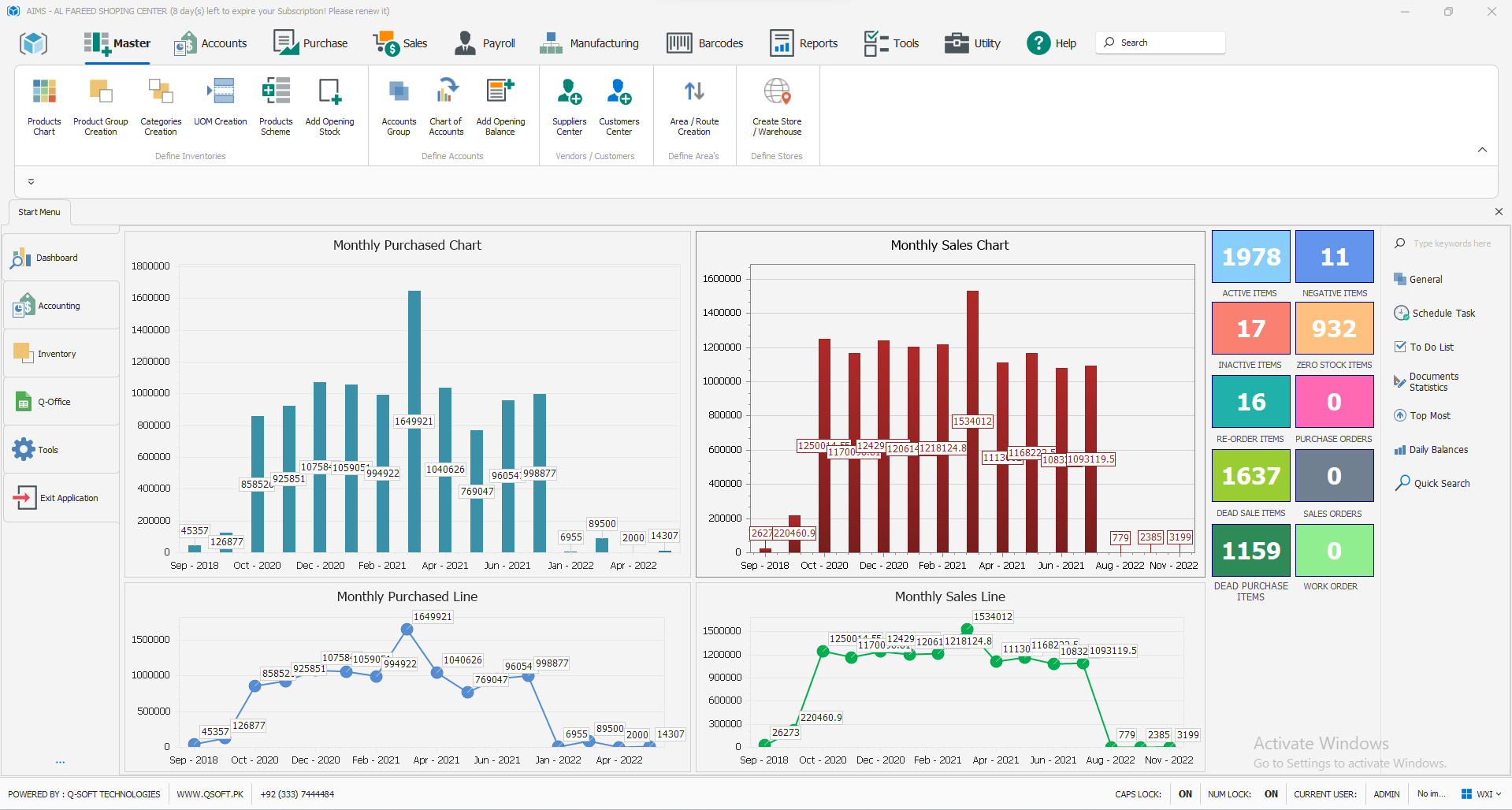
Dashboard & daily tools
Bring daily activity, stock conditions and useful actions into a working overview.
ActivityStock conditionsDaily tasks
DASHBOARD & DAILY TOOLS
Start the day with the business in view.
Sales and purchases review graphical business activity.
Stock conditions identify active, inactive, zero-stock and dead-stock products.
Reorder visibility focus on products requiring replenishment.
Scheduled tasks and to-do lists keep the next action visible.
Quick search and user maintenance navigate the work and manage access.
No matching modules.
Try another search or reset the category.
FROM CAPABILITY TO YOUR BUSINESS
See the whole picture. Then make it your own.
Let’s walk through the modules, configuration and deployment that match your workflows. Your demo will focus on the product release and functionality suited to your implementation.